
See what the rota costs
Read the week’s hours, wage cost and labour percentage as you build the rota, set a sales target for each day, and know who can see these figures.
On this page
Every shift is costed at what its person is paid, so the rota shows what the week will cost while you are still building it. Set against a sales target, that gives a labour percentage.
On the web: read the week
Go to Rota & team, then Rota
Under the location’s name, beside the week’s status, are two sets of figures:
- Projected is the plan: the week’s sales targets, then labour as a percentage of them, the wage cost of the shifts on the rota, and their hours.
- Actual is what has happened so far: sales taken, and labour from completed clock-ins at each person’s rate. Someone on shift now is counted when they clock out.
The labour figure is coloured against your location’s labour target: in range, a little over, or well over. Hover over it to see the target.
On the web: set a day’s sales target
- On the rota, change View schedule by from Days to Areas or People.
- Find the Day totals row. Under each day it has the day’s hours and wage cost.
- Type the sales you expect for the day in the box under them and press Enter. It says Sales target set, and the day’s labour percentage appears beside it.
Until at least one day has a target, Projected shows No revenue target and no percentage.
On the phone
- Open Rota and go to the week. The strip under the dates has Shifts, Hrs, Staff, Checks and Labour.
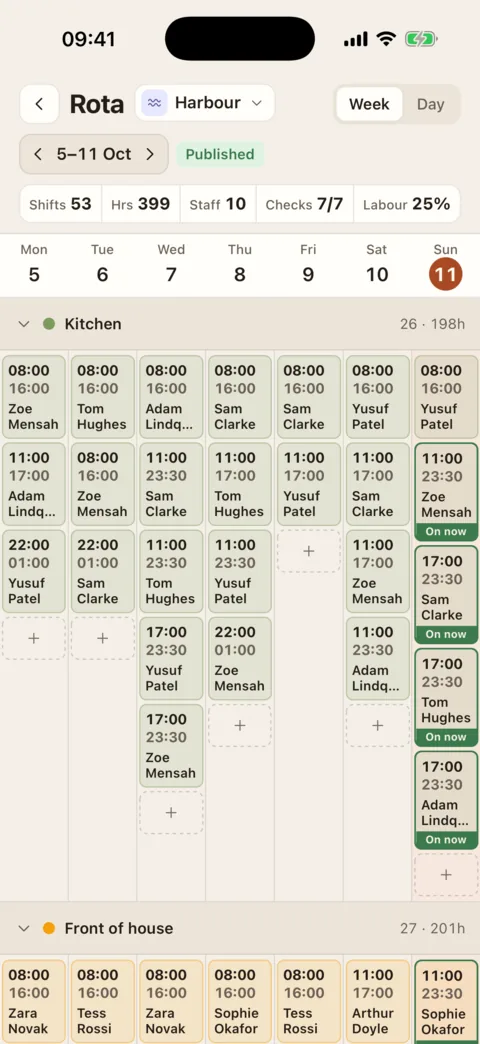
The strip under the week: shifts, hours, staff, checks and labour. Demo data - Labour is the week’s wage cost as a percentage of its sales targets, coloured against your labour target. Sales targets are set on the web.
Who sees what
- People who build the rota see the hours and the wage cost of the week they are building.
- Employees see shifts and times only. They are never sent the cost of the week or what a colleague is paid.
- Wage figures in Insights are for people with the “See and edit staff pay rates” permission, which Location Managers and Admins have by default. Without it, Insights shows hours and sales but no wages. See Use Rota Insights.
If it doesn’t work
- “No revenue target”
- No day in the week has a sales target yet. Set them in the Day totals row.
- “No sales data”
- Actual has no sales for the week yet. Sales appear once a till is connected, or when a day’s sales are typed into Insights.
Was this the right page?
If it did not answer your question, or the app does not match what it says, email us and we will put it right.