
Use Rota Insights
Compare hours, wages and sales with the plan for a day, a week or a month, and set budgets and sales targets.
On this page
Insights sets three things side by side for each day: what you budgeted, what the rota schedules, and what happened. It covers hours, wages and sales.
On the web
Go to Rota & team, then Insights
You can also get there from the rota: press Insights above the week, then Full insights.
- Choose the period. Day, Week or Month, with arrows to step back and forward. A day is shown by the hour.
- Read the tiles. Sales, Wages, Labour % and Sales per hour, each with a line saying what it is measured against, such as the rota or the target.
- Read the grid. Under Summary, each day is a column. Hours and Wages each have Budget, Rota and Actual. Sales has Forecast, Target and Actual.
- Narrow it. Choose one area in place of All areas to see its hours and wages. Show switches optional rows on and off.
What the rows mean
- Budget is what you plan to spend, in hours or wages. You type it.
- Rota is what is on the rota. The difference shown is against the budget.
- Actual is what was clocked and closed. The difference is against the rota, for days that are over.
- Forecast for sales is the average of the same weekday over recent weeks.
- Target is the sales you are staffing for. You type it, here or on the rota.
- Actual sales are net of VAT. They come from the till where one is connected; otherwise you can type a past day’s figure.
Set budgets and targets
On the web: type a figure or fill a row
- Click a Budget or Target figure and type over it.
- Or fill the whole row at once from its menu: Copy last week for any of them, Use forecast for the sales target, and for the wage budget a choice that sets it to sales times your labour target. It says how many days were filled.
Budgets belong to the whole location, so they cannot be changed while the grid is narrowed to one area.
On the phone
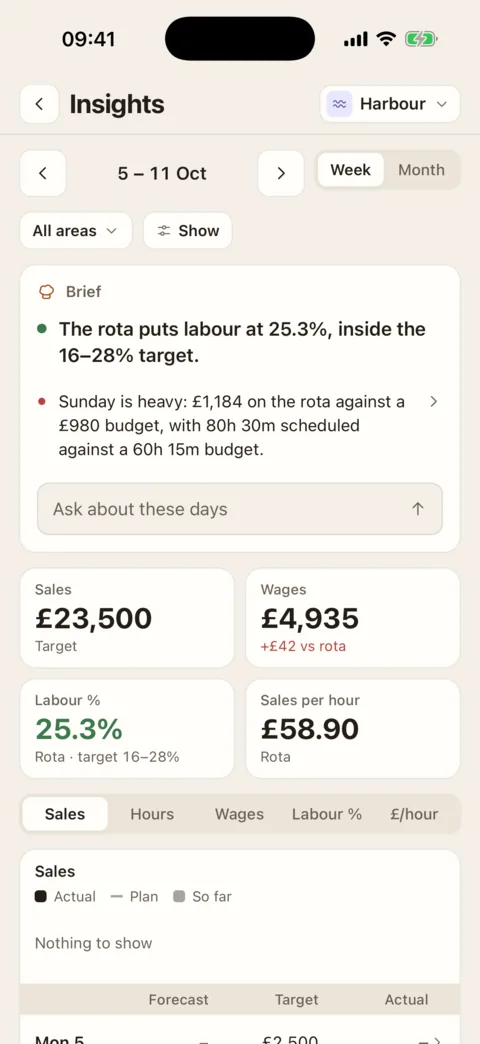
Open Me and press Insights. The phone shows the same figures for a Week or a Month.
If it doesn’t work
- There are no Wages or Labour % figures
- You do not have the “See and edit staff pay rates” permission. Insights then shows hours and sales only. An Admin can switch it on for you.
- “No till”
- Sales by the hour come from the till, and this location has none connected.
- “Nothing to fill from”
- The row you tried to fill has no source: last week has no figures, or there is no forecast yet.
- “Couldn’t save the figure”
- It was not saved. If it was a wage budget, that needs the “See and edit staff pay rates” permission.
- There is no Insights page
- Insights is for people who build the rota. See See what the rota costs for who sees what.
Was this the right page?
If it did not answer your question, or the app does not match what it says, email us and we will put it right.