
See your training
Find what you are being trained on now, what is coming up and what you have been signed off on, on the iPhone.
Your own training is on the iPhone app. The web has no page for it. You can read your record but not mark it: your trainer or a supervisor does that.
On the phone
- Open the Me tab. Under My file, the Training row says where you stand, for example “2 on now · 1 overdue”, Nothing on now or Not on any training.
- Press Training. Under Progress are three figures: Signed off (skills signed off out of all your skills), On now and Coming up.
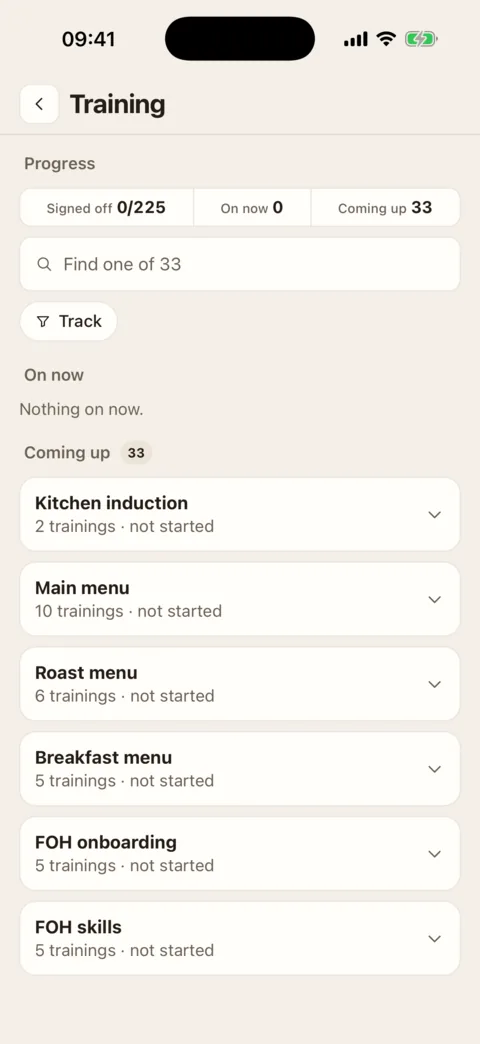
Your record: progress at the top, then what is on now and what is coming up. Demo data - Scroll to On now, Coming up or Done. Each card is one training, with the track it belongs to, a count such as 3/8 and a bar. With a lot coming up, the trainings are folded under their track: press the track to open it.
- Press a training to see its skills. Each skill says where it stands, with the latest note your trainer left under it.
- To find one training, type in the box that begins Find one of, or narrow the list with the Track filter.
What the words mean
- Not started: nobody has logged anything against this skill yet.
- Training: you have been shown it and are working on it.
- Ready to sign off: your trainer has told the people who sign off that you are ready.
- Signed off: someone who manages training has signed you off.
- Refresh due: you were signed off, and it is time to go over it again.
- N/A: this skill does not apply to you. It is left out of your count.
Under a training’s bar is when it is due: “due 4 Nov”, “shift 2 of 5” where it is counted in shifts, or “overdue 3d”. A training that has not opened yet says when it does, for example “opens 4 Nov”. Some trainings have no due date at all.
When something changes
You are told in your Inbox, and on your phone if alerts are on, when you are put on a track (New training), when skills are signed off (Skills signed off), when a skill is sent back (Skills to go over again) and when you have induction steps to confirm. Pressing one opens your Training screen.
If it doesn’t work
- “Not on any training”
- Nobody has put you on a track yet. It says “Tracks your manager adds you to show here.” Ask your manager.
- There is no Training row on the Me tab
- Training is not switched on for your location.
- A banner that begins “Offline · last updated”
- You have no signal. The screen is showing the last copy this phone loaded, and brings itself up to date when you are back online.
- A skill you know you were shown still says “Not started”
- Nobody has logged it. You cannot mark your own training: ask your trainer or supervisor to do it.
Was this the right page?
If it did not answer your question, or the app does not match what it says, email us and we will put it right.