
Book a trial shift
Book someone who is not staff yet in for a trial: who they are, when, who looks after them and what it pays. Then change or cancel it.
On this page
A trial is for a candidate: a name and one way to reach them. A candidate is not staff, has no sign-in and is not on the staff list. Their trial is drawn on the rota beside the shifts so the team knows who is coming in.
On the web
Go to Rota & team, then Trials
- Press Book trial. On the Staff page the same form is under the arrow beside Add employee, as Trial shift.
- The dialog is headed Book a trial. Check the Site.
- For someone coming in for the first time, leave it on New and type their Name and a Phone or email. For someone who has had a trial before and is still a candidate, pick Existing and choose them under Candidate.
- Pick the Day, and the times under From and To. A trial is 16 hours at most.
- Pick the Area they are trying in, and the Position (optional).
- Under Looked after by, pick the person who will be with them. It has to be someone who works at that site. They are the one asked how it went.
- Under Pay, choose Flat amount, By the hour or Unpaid. It starts on the site’s own rule. If you set pay rates, a box beside it takes the amount.
- Press Book trial. It says Trial booked, with the name, day and times.
On the phone
- Open Team, stay on Roster, and tap Trials.
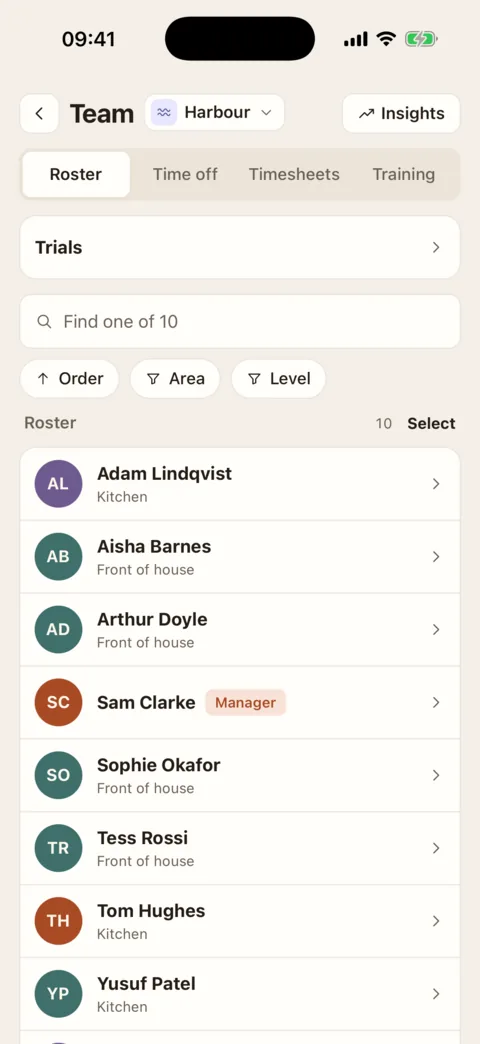
Trials is the row above the roster. Demo data - Press Book trial at the foot of the screen.
- Choose New or Existing. For a new candidate type their Name and a Phone or email; the box shows whether it has read it as a phone number or an email.
- Set the Day, the Start and the Length.
- Pick the Area, who it is Looked after by, and the Pay.
- Press Book trial. It says Trial booked.
What happens next
- The trial is on the Trials list under Upcoming, and on the rota for that week in a row called Trials.
- People who build the rota, or who book trials, see it straight away. Everyone else at the site sees a name, a time and an area, and only once that week’s rota has been published.
- When the trial has ended, the person looking after it is asked how it went. See Say how a trial went and hire.
Change or cancel a trial
Open the trial from the Trials list, or from the rota.
- Edit changes when it is, the area, who looks after them and the pay. On the web it says Trial changed; on the phone, Trial updated.
- Cancel trial is for one that has not started. Confirm, and it says Trial cancelled. To leave it as it is, press Keep.
- Didn’t come replaces Cancel trial once the start time has passed. It says Marked didn’t come. Nobody is asked how it went, and it is paid nothing.
The site’s trial rule
On the web, with one location chosen, the Trials page has a Trial settings button. It opens Trial shifts: what a trial pays at this site, how long one can run unpaid (Unpaid up to), how long candidates who are not hired are kept (Keep candidates), and up to five things to mark a trial on (Looked for). Changing it takes the permission to edit staff details there; the amounts take the pay rates permission.
If it doesn’t work
- “Trials aren’t yours to see here.” or, on the phone, “Not yours to see”
- You do not have the “Book trial shifts and say how they went” permission at this location.
- “Couldn’t book the trial”, with “A phone number or an email to reach them.”
- What you typed under Phone or email is neither. On the phone the box says Not a phone or email.
- “It has to end after it starts.” or “A trial is 16 hours at most.”
- Correct the times. The end has to be later than the start, and no more than 16 hours after it.
- “Whoever looks after them has to work here.”
- The person picked under Looked after by does not work at the trial’s site. Pick someone who does.
- “They have already been hired.”
- That candidate is staff now. Put them on the rota as a member of staff instead.
- “That trial was cancelled.” or “It already has an outcome.”
- A cancelled trial cannot be edited, and one that has its outcome cannot be cancelled. Book a new trial for the candidate.
- There is no box for the amount
- Pay amounts are for people with the “See and edit staff pay rates” permission. The trial takes the site’s own figure for the kind of pay you chose.
Was this the right page?
If it did not answer your question, or the app does not match what it says, email us and we will put it right.