
How team and people work
The ideas behind the staff list: invitations, a person’s record, home and other sites, levels, pay, candidates on trial and leavers, with links to each task.
On this page
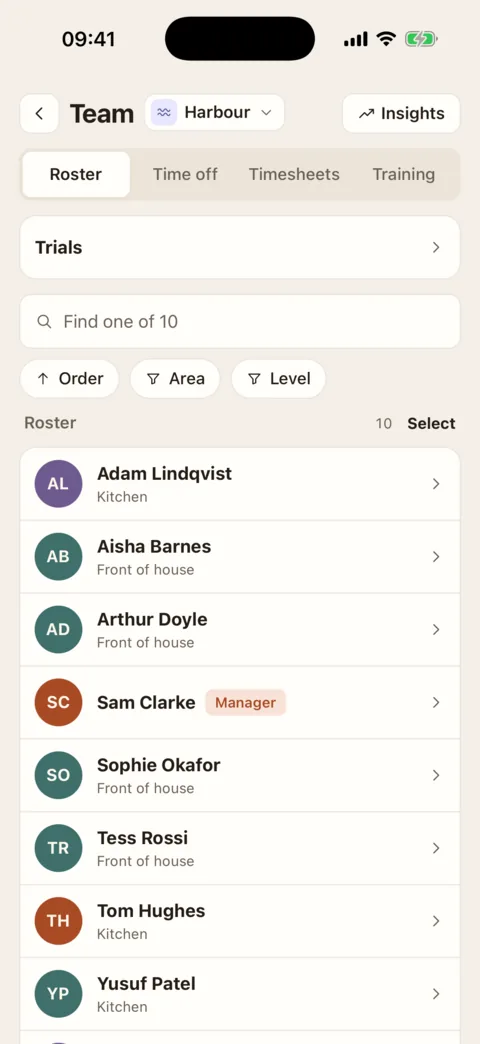
Everything about the people in your restaurant starts from one list. On the web it is Staff, under Rota & team in the sidebar (the section is called Team at a location that has the rota switched off). On the iPhone it is the Roster on the Team tab.
People join by invitation
There is no sign-up. A manager fills in a new starter’s details and an email goes to them with the link they use to create their sign-in. Until it is sent, the starter is a draft; until they use it, they are invited, not joined.
One record a person
Each person has a record with a tab for each part: Overview (how they have been doing), Details (name, contact, contract, areas, position), Employment (their file: address, start date, right to work, emergency contact, payroll details), Permissions, Training, Notes and Documents. You see the tabs that are yours to open.
- Find people on the staff list
- Edit someone’s details
- Record a right-to-work check
- See how someone is doing
- Change several people at once
Home site, other sites, areas and position
A person has one home site and can work at others too. That list decides which staff lists and rotas they are on. Within each site they have the areas they work, which is who the rota offers for a shift there, and one position, their job. Areas and positions belong to a site, so they go when the person is taken off it.
Levels decide who can do what
Everyone has one of four levels: Admin, Location Manager, Supervisor or Employee. A level switches a set of permissions on, and an Admin can switch single permissions on or off for one person. In this part of the app the permissions that matter are:
- “Edit staff details and where they work”: change records, sites, offboard. Admins and Location Managers by default.
- “See staff contact details and dates of birth”: see the list and people’s contact details. From Supervisor up by default.
- “See and edit staff pay rates”: pay is hidden from everyone without it. Admins and Location Managers by default.
- “Invite new staff”: Admins and Location Managers by default.
- “Book trial shifts and say how they went”: from Supervisor up by default.
- “Change people’s permission level and permissions”: Admins only.
A Location Manager’s or Supervisor’s level applies at the sites they work at, and nowhere else. That is why putting a manager on at another site is an Admin’s job: it makes them a manager there. An Admin’s level applies everywhere. None of these can be given to an Employee.
Candidates are not staff
Someone coming in for a trial shift is a candidate: a name and a way to reach them, with no sign-in and no place on the staff list. Their trial shows on the rota. Afterwards the trial is given an outcome. A hire turns the candidate into an invitation; a candidate who is not hired is deleted after the time your site has set.
Leavers are kept, not deleted
Offboarding sets a last day and a reason. The account closes at the end of that day; the record and history stay, under Left on the Staff page, and the person can be reinstated.
What is done where
The web does everything here. The iPhone covers finding and opening people, changing how someone is paid, their sites, areas and level, bulk actions, and booking and judging trials. Inviting someone, their employment file, right-to-work checks, performance notes and hiring from a trial are finished on the web.
Was this the right page?
If it did not answer your question, or the app does not match what it says, email us and we will put it right.