
Record waste
Record what went in the bin and why: tap dishes on the iPhone during service, or write one entry out in full on the phone or the web.
On this page
There are two ways to record waste. The quick way is for service: the menu is laid out as keys, you tap what was wasted and give one reason for the lot. The full way writes one thing out: a dish, a batch from the recipe book or anything else, with an amount, a note and a photo.
On the phone: the quick way
- Open Me and press Waste. From the prep list, the Waste key at the top opens the same screen.
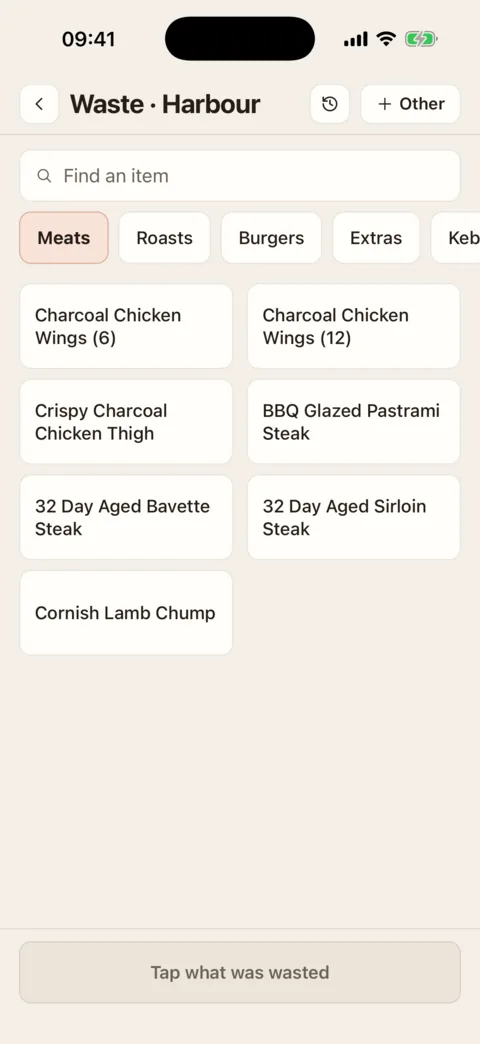
The menu as keys. Tap a dish once for each one wasted. Demo data - Tap each dish that was wasted. Tap again for two. Hold a dish to set a number. Use the categories along the top, or Find an item, to get to a dish.
- At the foot, press Why? and pick the reason. It is remembered: next time the last reason you used is shown there instead, and you press it to change it.
- Press Record, which shows how many it will record. It says Recorded.
To check before recording, press the count at the foot. The sheet headed Wasted lists each line, where you can change its number or give one line a different reason.
On the phone: one entry in full
- On the Waste screen, press Other at the top.
- Choose Menu item, Recipe or Other, and find or type what it was.
- Fill in How much and its unit: a dish goes by the portion; a recipe by the batch, portion, weight or volume; anything else by count, weight or volume.
- Pick the reason under Why. Under When, leave Now or choose Earlier today or Yesterday and a time.
- Add a Note or a Photo if it helps, then press Record.
On the web
Go to Menu, then Waste
- Press Record waste.
- Under What, choose Menu item, Recipe or Something else, and find or type it.
- Fill in How much and Why. Under When, leave Now or set the date and time it happened, up to 31 days back.
- Add a note or a photo under Note and photo if it helps.
- Press Record. It says Waste recorded and the entry is in the log.
What happens next
The entry is in the waste log. You see your own entries; people with the “See all recorded waste, correct it and void it” permission see everyone’s.
Without a signal
The phone keeps the menu’s keys from the last time it was online and says Offline · the menu as last seen. What you record is written to the phone first and sent when it can be; until then the screen shows how many are waiting to send.
What it cost
People who can see the till’s sales (the “See the till (POS) connection and its sales” permission) also get Cost of the lot on the full entry, and see values in the log. Nobody else is shown costs.
If it doesn’t work
- “No menu on the keys yet”
- The keys are the dishes on the menus that are switched on, and none is. Press Record something else for now, and see Switch a menu on or off.
- A dish is missing from the keys
- It is on a menu that is switched off, or has been archived. Use Other and type it.
- “Too late to undo — ask a manager to void it”
- The five minutes have passed. Someone with the “See all recorded waste, correct it and void it” permission can void it.
- “No connection”
- This phone has never opened the waste screen online at this location, so it has no menu to show. Open it once with a signal.
- “No waste to record here”
- You do not have the “Record waste” permission at this location, or Waste is switched off there.
- “Pick a reason from the list”
- The reason you chose has since been taken off the location’s list. Pick another.
Was this the right page?
If it did not answer your question, or the app does not match what it says, email us and we will put it right.